Monday, April 6, 2015

Snapchat Introduces Friend Emojis

Snapchat, the worlds largest picture sharing app released an update today which introduces "friend emojis". This functionality replaces the old system of being able to see who your Snapchat best friends are. Each one of your Snapchat friends will have an emoji beside their name indicating their relationship to you within the app, if they fall in a certain category. Some will get a sunglasses emoji, some a smiling emoji, and some no emoji at all. Below is a list of emojis and their meanings:
  • Gold Heart – You’re #1 Best Friends – The person you send snaps to most sends snaps to you most too
  • Grimace/Grit Teeth – You Have A Mutual #1 Best Friend – The person you send snaps to most is also who this person sends snaps to most
  • Smile – One Of Your Best Friends – This is one of the people you send snaps to most
  • Sunglasses – You Have A Mutual Best Friend – One of the people you send snaps to most is also one of the people this person sends snaps to most
  • Smirk – You’re Their Best Friend But They’re Not Yours – You’re one of the people they send snaps to most, but they’re not one of the people you send snaps to most
  • Fire – You Two Are On A Snapstreak – You and this person have sent snaps back and forth for the number of consecutive days shown
Snapchat released the information behind this new update not within the app store or through a blog post, but through their own Discover section of Snapchat. Below is the image sent to their Discover:

I think that this is a unique and interesting new feature that will make the Snapchat experience even more entertaining for the user and look forward to seeing the relationships I have with the people I Snapchat and to explore the inter-connective nature of the app.

Thursday, April 2, 2015

Get Smarter Through Mobile Apps!

So I had a bit of fun on this blog last night for April Fools Day with my riveting post about the best appetizers out there, but now it's time to quit foolin' and start smartin' - getting smarter that is. How many times have you thought to yourself that you would like to learn a new language or learn how to code a website? The app store has more to offer than fitness apps, video games, and social media apps. In this post I will introduce and briefly explain some of my favorite apps for exercising your brain!

Duolingo [Price: Free]


Duolingo is the best way to learn a foreign language if you don't have the time to devote to a classroom course or the money to shell out on the popular Rosetta Stone software. Languages that are available to be learned are Spanish, French, German, Italian, Portuguese, Dutch, Irish, Danish, and Swedish. Apple voted Duolingo App of the Year in 2013 and it's easy to see why. The app has an amazing user interface that is pleasing to look at and easy to use. Set up a profile either using your email address, Facebook account, or Google account, choose a language you would like to learn, and begin going through the lessons. The app has a fun level based system which at times makes it feel more like a game than actual learning.

Khan Academy [Price: Free]


[Download on iOS]

Stuck with a tough math problem? Can't figure out why two plus two equals four? Well if you answered yes to that last question then you might be beyond helping, but if you are stumped with something else, Khan Academy can help. Khan Academy offers tons of lessons in a multitude of different subjects: math, science, economics and finance, arts and humanities, and computing. These lessons range in difficulty from early math like counting all the way up to calculus and is a great way to learn about many subjects taught in schools whether you are struggling in class, or just want to learn on your own time.


Codecademy: Code Hour [Price: Free]


[Download on iOS]

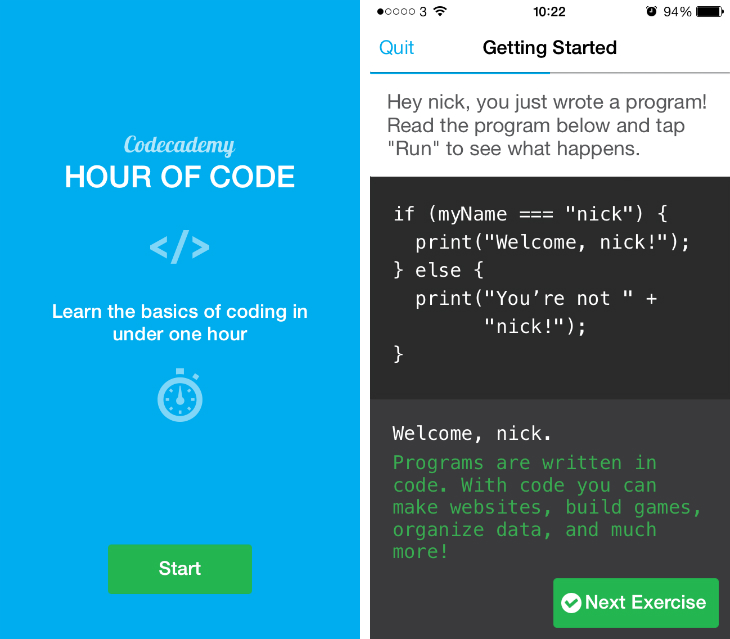
It's time now to talk about a different type of foreign language. Not one that is specific to one geographical location, but one that is specific to computing. Codecademy: Code Hour is the perfect introduction to the programming world. Based on the name of the app, the intent is to introduce programming to the user and show them the basics in as little as one hours time. The app teaches about data types, variables, comparisons, if... else... statements, and HTML. If you are looking for more than one hour worth of lessons, Codecademy is also available as a website at http://www.codecademy.com/.

Lumosity Mobile [Price: Free w/ Optional In-App Purchases]


If you are someone who is currently content with what they currently know and are not interested in learning a foreign language, learning math or science, or learning how to program, but are interested in keeping your brain in top mental condition, Lumosity Mobile is the app for you. Lumosity Mobile offers brain training exercises which they call workouts to strengthen the most important muscle in your body - the brain.

Wednesday, April 1, 2015

Breakdown of the Best Apps

You've know of plenty different apps out there today, but which ones are best? The following list will hopefully help you to know which apps are most delicious.

1. Mozzarella Sticks

A staple in the appetizer world and an instant classic. Even though deep down Mozzarella sticks are just fried cheese, dip these puppies in Marinara sauce and season with garlic and you've got yourself the perfect beginning to any meal.

2. Chicken Wings

Put on your favorite eating shirt because it's about to get messy with some chicken wings! Sauce them up with a variety of sauces ranging from BBQ, mild, hot, teriyaki, and so many more. Accompany the delectable pieces of meat with a side of ranch or blue cheese and a bundle of celery sticks for best results.

3. Onion Rings

Are you a health nut? Do you need some vegetables in your daily diet? Say no more because I have the perfect appetizer for you: deep fried onion rings. Onions are low in saturated fats, cholesterol, sodium and high in vitamin C so you can feel good knowing you made a healthy choice as your appetizer.

4. Nachos Supreme

Nachos were first created in 1943 by Ignacio Anaya in Piedras Negras, Coahuila, Mexico. Since then, many improvements have been made to the original recipe of corn tortillas, melted cheddar cheese, and sliced jalapenos. I recommend tomatoes, ground beef, and onions.

5. Bread and Butter

Now this is the bread and butter of the appetizer world. Because it is just that: bread and butter. One part bread, one part butter. Bread and butter.


Thursday, March 26, 2015

Using Apps to Get and Stay Healthy

According to the Center for Disease Control and Prevention, more than one third of U.S. adults are obese. That means that 34.98% or 78.6 million Americans have a Body Mass Index (BMI) of 30 or more. So while almost 35% of Americans are obese, a survey put out by the Pew Internet & American Life Project found that 56% of all American adults own a smartphone. If you happen to be one of those individuals which I assume you are based on the fact that you are reading a blog about mobile apps, your smartphone can help you to either get out of that pool of 78.6 million obese Americans or never get there in the first place.

1. Calorie Tracking Apps

Keeping track of calorie intake can be difficult. Often times, nutritional information is not readily available because the foods you eat throughout the day don't always come in their original packaging. Apps like Lose It! and myFitnessPal offer an easy way to plan and track calories. Simply download the app, enter in your current weight and desired weight and you will be set up with a daily limit in order to reach your goal. Calorie tracking apps offer a huge database of foods that are just a search away and not only provide calorie information, but other nutritional information like protein, fiber, vitamins, and fats.

2. Fitness Bands

Now that we've got food intake covered, the next important thing when trying to lose weight is to get out there and exercise. Fitness bands like the Fitbit and Up24 by Jawbone are increasing in popularity recently. Simply put the band on your wrist and sync it to your phone or computer and begin tracking your daily fitness levels with an app. On top of tracking steps and calories burned, more advanced models of fitness bands can even track sleep activity and heart rate. Many apps that track calorie intake or fitness activity have compatibility with fitness bands as well. Fitness bands range in price from around $75-$250 and can be a very effective way to motivate someone to lose weight.

3. Activity Tracking Apps

If you aren't willing to spend the extra cash on a fitness band but still want to be able to monitor your activity throughout the day, then you are in luck! There are plenty of apps on the app store that use your phones GPS capability to track a workout. Turn on the app, go for a walk or run and the app will track how far you traveled, where you traveled to, and how long it took as well as how many calories were burned in the process. My personal favorites are myFitnessPal, which was mentioned above or MapMyRun.

If you are someone who is interested in losing weight or staying at a healthy weight, I hope that this post has helped inform you as to some ways your phone can help you to achieve your goals, whatever they may be.


Wednesday, March 11, 2015

The Apple Watch and Apps

This past Monday, Apple had their Spring Forward Event in which they announce the new products that consumers can expect to find on the shelves later in the year. This year, Apple announced a new 12-inch Macbook with retina display and the much anticipated Apple Watch. The Apple watch is already available for preorder and will be sold for $349-$17,000 depending on the model. However, the Apple Watch Edition costs upwards of 10,000 dollars and is only for the high spenders so most purchasers will be spending anywhere from $349-$399 for the Apple Watch Sport or $549-$599 for the Apple Watch.

If you happen to be someone who is considering purchasing the Apple Watch then I hope this post will help keep you informed on what you can expect from it in terms of software and app compatibility. Not every app will be able to be ran on the Apple Watch so don't expect to play Clash of Clans or Candy Crush on your wrist.


Apple released the WatchKit to developers back in November so there are  apps available upon release. In addition to being able to use some of Apple stock apps like Mail, Phone, and Messages and keep track of their fitness levels , users will be able to browse Instagram or Twitter, request a ride via Uber, or even use their phone as a key to a hotel. With that said, that appears to be some of the only thing you would be able to do... 

I have high hopes for the Apple Watch but currently the lack of apps on the market for it is worrisome to me. But this is Apple we're talking about. Developers will undoubtedly arrive and make some very, very cool apps. 

Monday, March 2, 2015

Tinder Plus - The Update that Will Ruin the Popular Dating App

The developers behind Tinder have recently began rolling out an update to the popular dating/hookup app that adds in a premium membership feature. As I stated in my last blog, I absolutely hate in-app purchases with a passion, and that hatred isn't limited to just games.

Currently, Tinder allows you to swipe right on as many potential matches as you like. With the update, the user will be limited as to the number of right swipes they are allowed per day. Users will be forced to purchase a monthly premium membership to unlock unlimited swipes.

What's more is that not only will there be a premium fee, but the fee will vary depending on the user's location, gender, and even age. In the US, if you are over the age of 30, it will cost you $19.99/month to unlock unlimited swipes, and if you are under 30, it will cost $9.99/month.
Unlimited swipes isn't the only thing users would be able to unlock, they would also unlock something called "Passport", allowing them to change their location to anywhere in the world, "Rewind" which undoes the user's last swipe, and removal of ads from the app.

While there are some perks, I believe that the cost is far too much and that the reason why Tinder has been as successful as it has been is because of the fact that it is free to use. The developers need to take a look at who their target market is - college students aged 18-22. Very few people in that target market will want to pay those fees and will instead choose to uninstall the app. This is a surefire way to kill the app altogether.

Thursday, February 26, 2015

One Game, One Price – Say Goodbye to In-App Purchases with These Games

Two weeks ago, Apple's featured a spot in it's app store solely dedicated to showing off games with no in app purchases attached to them. There is a reason why the highest grossing apps on the app store are "free" games. Clash of Clans ranks right there at number one in total gross income due to its sale of in game currency like gems that help the player advance through the game more quickly. Candy Crush Saga is within the top five highest grossing games through the sale of extra moves, extra lives, and in game currency. The idea behind in game purchases is not a new concept - games on a number of platforms from Xbox to Playstation to PC have offered similar in-game purchases but no other platform has mastered in-game purchases quite like mobile apps have.

When I see a game on the app store that looks fun to me, I immediately check to see if it has in-app purchases. If it does and these purchases look anything like "bag of gems - $.99", I immediately start my search for a different game. In my app store travels I have found quite a few very fun apps that offer no in-app purchases and below are a few of my favorites.

Super Hexagon [Price: $2.99]


[Download on iOS]
[Download on Android]

Super Hexagon is one of the most difficult yet addicting games I have played on any platform. In Super Hexagon, you play as a geometric shape that must move around a hexagon in order to avoid being hit by the walls. Tap right to rotate clockwise and tap left to rotate counter-clockwise to avoid lines that move inward, trying to hit your shape. The game has six game modes: hexagon(hard), hexagoner(harder), hexagonest(hardest), and "hyper" modes for each that make the walls move inward faster. Last a minute on each level to unlock the next - a feat that sounds easier than it is. The game has an intense and fun soundtrack coupled with vibrant colors and is sure to leave you playing for hours trying to beat your own high score.

League of Evil [Price: $1.99 (iOS) or $0.99(Android)]


[Download on Android]
[Download on iOS]

If you love Super Mario then you will love League of Evil. It's a platform game in which you play as
a secret agent who must punch an evil scientist in the face. Navigate through obstacles by jumping, tumbling, punching, and running. Collect briefcases in each level and try for a fast level-clear for an added challenge. What I like most about League of Evil is the pixel artwork. It has sort of a vintage feel to it that reminds me of old games for the NES. If you like League of Evil, be sure to check out its sequels, League of Evil 2 and League of Evil 3 as well for more levels!

Ridiculous Fishing [Price: $2.99]


[Download on iOS]
[Download on Android]

It's cold out here in the mid-west, which means no fishing unless it's of the ice variety. So why not enjoy a little bit of virtual fishing? Billy the fisherman drops his lure into the water and you must control the lure by tilting your phone from side to side. avoid hitting fish with the lure for as long as you can. Once you do inevitably collide with a fish, you will begin to ascend back out of the water. While ascending, collect as many fish as possible. After you reach the surface, this is where things get ridiculous. The fish that you collected will fly out into the sky and you must shoot them with shotguns, uzis, rocket launchers and other forms of weaponry. After each round you gain money which can be used to purchase other power ups, weapons, and accessories.

Solitaire [Price: FREE]


[Download on iOS]
[Download on Android]

It's just Solitaire... What more do you need to know? Kill time with this classic card game made into an app by MobilityWare.

Monday, February 23, 2015

The New YouTube App Just for Kids

Now available on both Android and iOS devices, the new YouTube Kids App brings a softer user interface and a brighter, more playful design to your phone or tablet making it easier for children to navigate. Aside from just the looks of the app, Google implemented a number of built in parental controls to give parents a say as to what their child is allowed to see or hear within the app. Parents have the ability to set a timer which limits their child's viewing, a sound option which allows parents to cut off music or sound effects, and the ability to disable the search function so that only the videos on the YouTube Kids home screen are view-able. There is also a feedback submission form that allows parents to send in their recommendations and thoughts on the app.

The app is advertised as the "first Google product built from the ground up with the little ones in mind.”, and why not? children are a growing demographic on YouTube with child-focused videos being published every day. The goal of the app is to provide kids with a safe environment to watch their favorite shows and videos from Thomas and Friends to Sesame Street and other online hits that originated on YouTube like TuTiTu, and Super Simple Songs. The YouTube Kid's app is the perfect way for kids to stay busy while still allowing parent's to monitor and regulate usage.

Below is the release video from Google:
Download from the Google Play Store
Download from iTunes

Thursday, February 12, 2015

Organizational Apps – Best Apps to Increase Your Productivity

I am a list person; grocery lists, to-do lists, no fly lists – okay so maybe not that last one, but lists are an important part of my life and without them I would be an absolute mess trying to remember everything I need to purchase from the store or what assignments I need to complete for class and by when. This is a blog based around mobile apps, and if by chance you missed the title of this post you might be wondering “what do apps have to do with lists?” There are several hundreds of applications on both the Apple App Store and Google Play Store dedicated to increasing productivity, many of those through the use of lists. I am here to tell you which apps I find the most useful and pleasing to use.

1. Sunrise Calendar [Available on iOS, Android, and Desktop] [Cost: Free]

Ever wish you could hire a personal assistant who could keep track of every appointment, every meeting, every event in your life and make sure you remember to attend them? With Sunrise's incredibly affordable cost of “free” you won't have to worry about paying some assistant, just head over to your app store of choice and press “install”! Sunrise is the what the stock iOS and Android calendar app could be if they were on steroids. What makes Sunrise great is the ability to connect a multitude of different accounts across the web to your calendar. Gmail, Evernote (which is mentioned later in this blog), LinkedIn, Facebook, and many other web services. Linking these accounts helps to automatically create events as they occur. The developers are constantly implementing additional services to the app with every update. This combined with the beautiful user interface makes it my favorite calendar app. Sunrise was recently purchased by Microsoft which is quite the endorsement.


2. myHomework [Available on iOS, Android, and Desktop] [Cost: Free w/ In-App Purchases]

Many colleges around the United States including UNI are now finishing up their fifth week of classes. If you are a college student and are anything like me, now is the time when assignments are starting to pile on and it can be a little overwhelming to remember which assignments are due for which class. MyHomework is an application that acts as a digital student planner. MyHomework allows you to enter in which classes you are currently taking and then log what has been assigned in which class. The app allows you to enter when an assignment is due, the priority this assignment has in your school life, and allows you to set a reminder alert to go off at a time determined by you. MyHomework is a fantastic way to stay on top of your schoolwork and get that much closer to a 4.0!


3. Evernote [Available on iOS, Android, and Desktop] [Cost: Free w/ Optional Premium Membership]

Now that we've talked about linking Evernote with Sunrise and using myHomework as a way to keep track of assignments due in your classes, it's time we talked about Evernote and how it can help you keep notes in those classes. Throw away the pencil and paper and move into the digital age with Evernote's sophisticated note taking technology. Evernote allows you to take notes on one device and sync it across several other devices instantly. Like Sunrise, the user interface is what really jumps out to me with Evernote. It is simple to use and looks incredible as well. Evernote will help you take better notes and keep better track of those notes and just be more productive in general.

4. Clear [Available on iOS] [Cost: $4.99 w/ In-App Purchases]

In this day and age, simplicity is key, and the developers behind Clear have created possibly the simplest to do list app in the app market. Available exclusively on iOS, Clear uses a gesture based design that allows users to input any list that they need to remember. Be it a shopping list or to do list, Clear has got you covered. Swipe down on your screen to create an item, swipe to the right once you have completed that item or swipe left to delete it, tap and hold to move an item up or down on the priority scale. What makes Clear unique is that because of this gesture based interface, there are no buttons which makes for a very unique but fun user experience.


Thursday, February 5, 2015

An App a Day Keeps the Boredom Away!

Welcome to my blog, An App a Day! In this blog I hope to cover a variety of topics as they relate to mobile and web apps. As a twenty-one year old college student, I am obsessed with my cell phone and have a strong interest in the use of apps specifically. I love learning about new apps on the market, learning what apps my friends are using and how they are using them, and really just mobile technology in general. We are fortunate enough to be living in an age where people have access to terabytes upon terabytes of information at their fingertips at all hours of the day through the use of smartphones. Both the Google Play Store and the Apple App Store are constantly updated with application after application with developers hoping theirs will be the next big thing. I will cover these apps in this blog through reviews and posts about the mobile application world. Be sure to check back every once in a while!